Sign up for Photobucket and upload your pics. Select the IMG and paste it into the box:
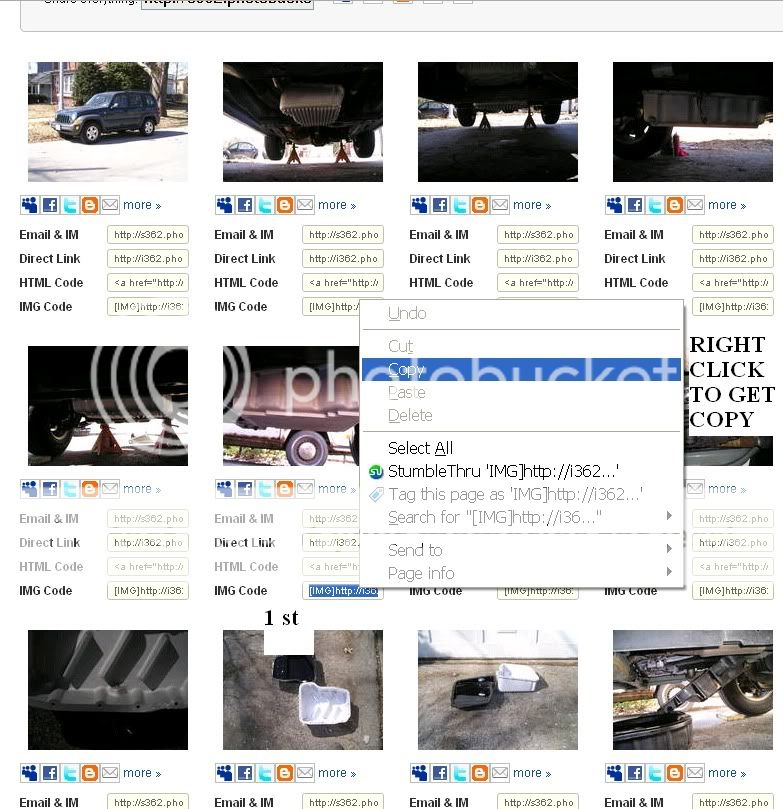
Don't feel bad, took me a little time to get this to work.
My explanation is a little remedial but easy to understand.
| LOST JEEPS http://www.lostjeeps.com/forum/phpBB3/ |
|
| help with image insert http://www.lostjeeps.com/forum/phpBB3/viewtopic.php?f=5&t=49351 |
Page 1 of 1 |
| Author: | dthdcrd [ Sat Jan 16, 2010 4:04 pm ] |
| Post subject: | help with image insert |
Not very computer savvy, trying to post something here and include a few images. Every time I click on Img it just paste I thought it would allow me to browse pics on my computer I wanted to attach?? Tried to cut and paste and that did not work. Can anyone help? I have something worthy, I think... Thanks in advance. |
|
| Author: | stoutdog [ Sat Jan 16, 2010 4:21 pm ] |
| Post subject: | Re: help with image insert |
dthdcrd wrote: Not very computer savvy, trying to post something here and include a few images. Every time I click on Img it just paste I thought it would allow me to browse pics on my computer I wanted to attach?? Tried to cut and paste and that did not work. Can anyone help? I have something worthy, I think... Thanks in advance. You need to post a url between the two bracketed things: [img] and [/img ] To give your photo a url, you can use free online sites like photobucket.com |
|
| Author: | dthdcrd [ Sat Jan 16, 2010 4:26 pm ] |
| Post subject: | Re: help with image insert |
OK, got it. Thanks! |
|
| Author: | mikey1273 [ Sat Jan 16, 2010 4:51 pm ] |
| Post subject: | Re: help with image insert |
if you use picasa web you can link to your pics in your wb albums the same way. that is what I do. to get the URL for the pic you have to right click on it then copy and paste the url line. |
|
| Author: | LibertyCRD [ Sun Jan 17, 2010 11:05 am ] |
| Post subject: | Re: help with image insert |
It would be SO much easier if you could just upload pics directly from the PC for avatars and images in threads, like you can do on other forums. Why isn't that feature enabled here? Is it too space-consuming? |
|
| Author: | warp2diesel [ Sun Jan 17, 2010 6:18 pm ] |
| Post subject: | Re: help with image insert |
Sign up for Photobucket and upload your pics. Select the IMG and paste it into the box: Don't feel bad, took me a little time to get this to work. My explanation is a little remedial but easy to understand. |
|
| Page 1 of 1 | All times are UTC - 5 hours [ DST ] |
| Powered by phpBB © 2000, 2002, 2005, 2007 phpBB Group http://www.phpbb.com/ |
|