LOST JEEPS
http://www.lostjeeps.com/forum/phpBB3/

Night photography?
http://www.lostjeeps.com/forum/phpBB3/viewtopic.php?f=30&t=48477
Page 1 of 1

Author:  oldhockeyvb [ Mon Dec 14, 2009 3:38 pm ]
Post subject:  Night photography?

I need some advice from my photographically inclined friends. Christmas eve we are going to Tumacacori mission to view the luminarias after dark. What settings should I set my Canon DSLR on to view the mission at night, with all the luminarias set up along the walkways in the courtyard. I have a tripod

Author:  AZKJ [ Mon Dec 14, 2009 4:27 pm ]
Post subject: 

My two pesos for whatever it's worth....

If it was me, I'd just leave my camera set to what I always use:

- priority mode
- ISO in auto mode
- and center weighted focus/metering

If you want to kick it up a notch, pick your own ISO speed, but be careful of noise at higher speeds (each make/model is different on how high you can go before the pictures start getting crappy). I would still leave it in priority mode.

Using your tripod is a good idea, but using a remote shutter release will eliminate 'all' camera shake. If you don't have one, use the timer feature on your camera instead of pressing on the shutter release button which can cause camera shake, even on a tripod.

You might also want to play with the white balance to get rid of the orange glow from the candles, lights or whatever they're using.

Maybe Russ, or someone else could chime in.

Author:  corwyyn [ Mon Dec 14, 2009 7:44 pm ]
Post subject: 

My plan if I were shooting the scene would be to use manual mode, set the ISO to 100 or 200 (mine only goes down to 200 :? ), f-stop at f/8 and shutter speed at anywhere between 10-30sec. f/8 is a good all-around aperture to get most everything in focus and the longer shutter speed will give you a brighter scene, plus any foot traffic will be blurred which can make a nice effect. I do agree with AJ that using either the timer or a shutter remote will help eliminate any tripod shake. You could always use shutter priority mode set at f/8 and see how long the camera thinks the shutter should be open, then take some shots on either side of that speed. That's the wonderful thing about digital, you can see results immediately and discard anything you don't want.
Author:  phxtoad [ Mon Dec 14, 2009 10:59 pm ]
Post subject: 

Vern,

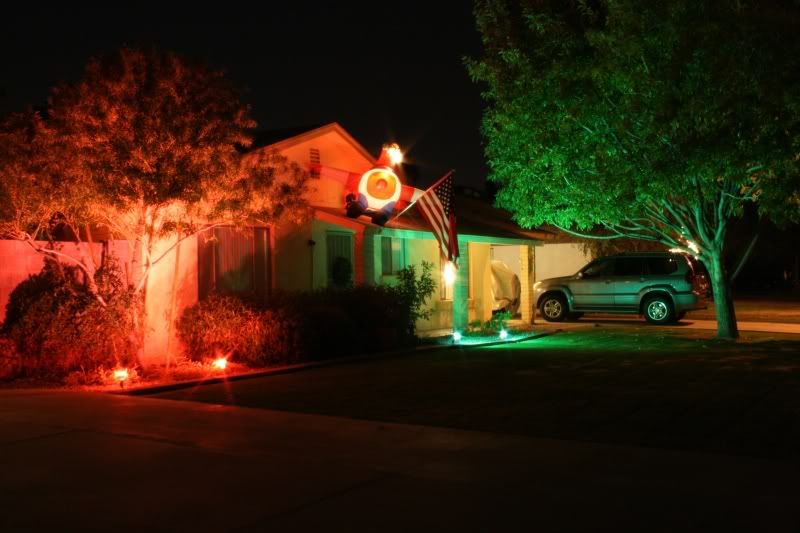
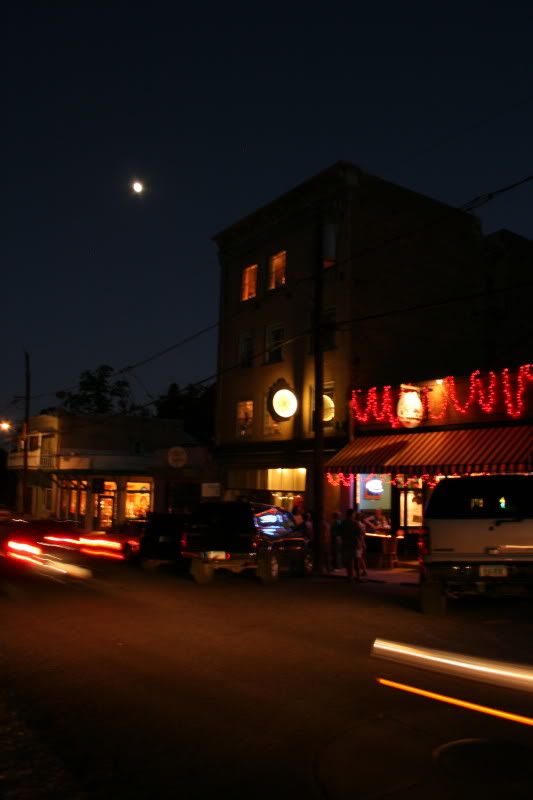
Here's a couple examples. I am a total amateur. I forget half the stuff I learn every time I take the camera out. I was fiddling around and got these shots:

Image
Camera set to Shutter Priority AE, tripod shot
Shutter set 30 second exposure
Aperture Value set to 25
ISO set to 800
Focal length 25 mm
White Balance on Auto

Image

Camera set to Manual, hand-held shot
Shutter set .5 second exposure
Aperture Value set to 5.6
ISO set to 400
Focal length 18 mm
White Balance on Shade

I really have no idea what all this means. Thank goodness for digital.

Author:  AZKJ [ Mon Dec 14, 2009 11:53 pm ]
Post subject: 

Kevin... very good points. The bottom line as you know is... different methods produce different results. The camera also has a lot to do with it too. My Nikon will go to ISO 1600 without much noise in priority mode with the ISO set to auto (3200 in manual).

If you have the time to fiddle around and get everything just right, you are correct... manually setting the F-stop, shutter speed and ISO will produce the better picture. If you just want to get a good picture quickly and move on, priority mode in auto ISO will also give good results that are acceptable for most people.

Here are two pics I just took in low light. The first pic set manually and after three exposures, produced a better pic, no doubt. Pic two is one exposure, not a bad compromise for a shoot and run.

Todd... nice pictures, I really like the colors. To compare picture quality of the different settings, you need to take pics of the same subject under the same conditions. It's really hard to tell using two completely different pictures.

Manual Mode
ISO 200
F-10 @ 10 sec
Exp Comp -0.7

Priority Mode
ISO 1600 (auto mode)
F-5.6 @ 1/2 sec
Exp Comp -0.7

Author:  Neatus [ Tue Dec 15, 2009 12:35 pm ]
Post subject: 

Vern, if you go to Flickr and look up night shots you may be able to look at the info of the image to find out what settings they used. Many times it will show the type of camera and settings that were used to take the pic.

Page 1 of 1 All times are UTC - 5 hours [ DST ]
Powered by phpBB © 2000, 2002, 2005, 2007 phpBB Group
http://www.phpbb.com/