| LOST JEEPS http://www.lostjeeps.com/forum/phpBB3/ |
|
| Noob from WY into http://www.lostjeeps.com/forum/phpBB3/viewtopic.php?f=43&t=93173 |
Page 1 of 1 |
| Author: | WyoRockMan [ Thu Jul 09, 2026 1:51 am ] |
| Post subject: | Noob from WY into |
Hello from WyMont! Northern Wyoming, from Montana to be specific. Used CRDs in the past at work and now want to "play around" with them again. Kind of jumped in both feet and bought two recently. Plan is to build them both up and trial different parts side X side. Here's the two UGLYs. UGLy1 has its new stance and shoes, UGLy2 is still stock. https://drive.google.com/drive/folders/12Un5ek_gBncJMQBk5jwqKn6LyjfXD1Zf?usp=sharing Should be a fun adventure, until the wife reconciles the books. Jason |
|
| Author: | WWDiesel [ Thu Jul 09, 2026 3:31 pm ] |
| Post subject: | Re: Noob from WY into |
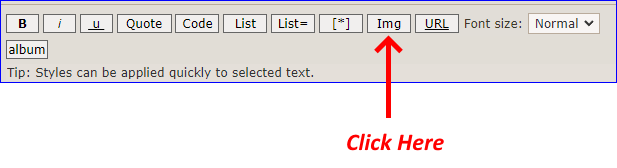
FYI: How to Post & Share Pictures on LOSTJeeps Forum You can post & share pictures and images on LOSTJeep.com, you first have to join and use a picture sharing/hosting service like PostImage or one of the many *others listed below. Postimages — free image hosting / image uploadProvides free image upload and hosting integration for forums. Free picture hosting and photo sharing for websites and blogs. One very important thing to remember when using image tags: the image you display must already be available on the internet (it cannot exist only on your computer or mobile device for example, unless you have it shared on a webserver!). After joining PostImage or one of the *other picture hosting services and uploading your pictures to the site that you want to share: Instructions to post a picture: Click on the "IMG" button on the top of your post. ![]() You will get this: [img]-[/img] Then paste the URL link for your picture in between the BBC code tags: Code: [img]picture address goes here[/img] Should look something like this: [url>=https://web address "link" of shared picture .jpg or .png. etc...<[/img][/url] Your shared picture MUST end in with a picture format extension like .jpg, .png, etc… *Some of the most popular image hosting *sites/services where you can upload and store images so you can share the images/photos on a forum:

• Google Photos. ...https://photos.google.com/ • Imgur. ... https://imgur.com/ • Dropbox. ... https://www.dropbox.com/ • Flickr. ... https://www.flickr.com/ • 500px. ... https://500px.com/ • SmugMug. ... https://www.smugmug.com/ • FreeImageHosting. ... https://www.freeimagehosting.net/ Admin
|
|
| Author: | WyoRockMan [ Fri Jul 10, 2026 11:29 am ] |
| Post subject: | Re: Noob from WY into |
![]()
|
|
| Author: | WWDiesel [ Fri Jul 10, 2026 1:28 pm ] |
| Post subject: | Re: Noob from WY into |
Welcome to the LOSTJeeps Forum! Please tell us about your Jeep, mods, upgrades, etc... Click on: "User Control Panel" (top right-hand corner), and then click on "Profile", you be able to update your Signature and list your vehicle mods, edit your Profile, and add an Avatar if you so desire. Adding a signature, location, vehicle information, etc... to your profile greatly helps others when responding to questions or making comments. See Instructions below: If you have not read Sam's CRD Noob Guide, please do so as there is a lot of very useful information contained in it and it will help educate you about this unique little diesel engine. Factory Service Manuals available for viewing and / or downloading Post questions, concerns, comments, if you have any. ADMIN
|
|
| Page 1 of 1 | All times are UTC - 5 hours [ DST ] |
| Powered by phpBB © 2000, 2002, 2005, 2007 phpBB Group http://www.phpbb.com/ |
|