It is currently Sun Nov 01, 2026 5:56 am

All times are UTC - 5 hours [ DST ]


Post new topic Reply to topic  [ 8 posts ] 
Author Message
 Post subject: Pictures and avatar
PostPosted: Sat Jan 02, 2016 11:07 pm 
Offline
LOST Newbie

Joined: Thu Dec 31, 2015 10:13 pm
Posts: 6
I cannot figure out how to post pictures of my Jeep and how to change my avatar. Can someone please help. Thanks


Top
 Profile  
 
 Post subject: Re: Pictures and avatar
PostPosted: Sun Jan 03, 2016 2:49 am 
Offline
Lifetime Member
Lifetime Member
User avatar

Joined: Tue Mar 31, 2009 4:03 am
Posts: 1503
Location: S.W Washington
First you will need to join a photo hosting site like Photobucket. Once joined, you will need to upload Pics to the site. Then;...
For your Avatar,
Go here. User Control Panel
On the left click on "Profile". Then click on "Edit avatar"
Once on that screen you will need to get the link code from the photo hosting site of your avatar Pic. (On photobucket you want to use the code next to "Direct" under "Photo links" or the code next to "Direct" under "Share this photo".), copy that text, come back to the "Edit avatar" page and paste the link code into the space next to "Link off-site:", then click the "Submit" button.

To post Pics in a thread:
Same as above, as far as uploading Pics and getting the link code.
But in your post you will need to click the "IMG" button at the top (which will automatically put the IMG code into your post). In the center of the ] and [ brackets of the IMG code, paste the link code. [img ]Paste link code here[ /img] It will look something like this.
[img ]http: //i266.photobucket. com/albums/oo101/Scar/Bump00 9.jpg~original[ /img]
When you click the "Submit" button the Pic will show up like this.
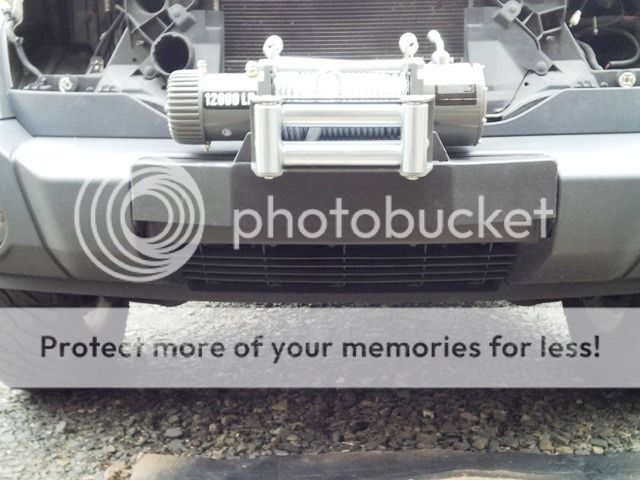
Image

When posting multiple Pics in a thread, be sure to add a "return" after each IMG code end[ /img]Return here, so your pics will be one over the other. That way folks can scroll down to see the next Pic.
Also, if you delete or move a pic on the hosting site, it will no longer show up in a post here. This is because the link will be broken. Same for your avatar.

_________________
07 KA Light Khaki, Manual trany.
2.5" Adjust-A-Strut JBA lift, Euro taillights,
Home made; Front Tilt Hood, Roof Rack, RAM Air, & CAI.
ESP Off Switch
Take a ride on the Trō side!

Image


Last edited by Scar0 on Sun Jan 03, 2016 8:16 pm, edited 1 time in total.

Top
 Profile  
 
 Post subject: Re: Pictures and avatar
PostPosted: Sun Jan 03, 2016 9:24 am 
Offline
LOST Newbie

Joined: Thu Dec 31, 2015 10:13 pm
Posts: 6
Thanks, I will give it a try

Sent from my HTC One using Tapatalk


Top
 Profile  
 
 Post subject: Re: Pictures and avatar
PostPosted: Sun Jan 03, 2016 9:01 pm 
Offline
Lifetime Member
Lifetime Member
User avatar

Joined: Tue Mar 31, 2009 4:03 am
Posts: 1503
Location: S.W Washington
Your welcome. Looking forward to the Pics!

_________________
07 KA Light Khaki, Manual trany.
2.5" Adjust-A-Strut JBA lift, Euro taillights,
Home made; Front Tilt Hood, Roof Rack, RAM Air, & CAI.
ESP Off Switch
Take a ride on the Trō side!

Image


Top
 Profile  
 
 Post subject: Re: Pictures and avatar
PostPosted: Mon Jan 04, 2016 2:11 am 
Offline
Lifetime Member & Advertising Vendor
User avatar

Joined: Mon Sep 06, 2010 5:52 pm
Posts: 2172
Location: NEVADA
Scar0 wrote:
First you will need to join a photo hosting site like Photobucket. Once joined, you will need to upload Pics to the site. Then;...
For your Avatar,
Go here. User Control Panel
On the left click on "Profile". Then click on "Edit avatar"
Once on that screen you will need to get the link code from the photo hosting site of your avatar Pic. (On photobucket you want to use the code next to "Direct" under "Photo links" or the code next to "Direct" under "Share this photo".), copy that text, come back to the "Edit avatar" page and paste the link code into the space next to "Link off-site:", then click the "Submit" button.

To post Pics in a thread:
Same as above, as far as uploading Pics and getting the link code.
But in your post you will need to click the "IMG" button at the top (which will automatically put the IMG code into your post). In the center of the ] and [ brackets of the IMG code, paste the link code. [img ]Paste link code here[ /img] It will look something like this.
[img ]http: //i266.photobucket. com/albums/oo101/Scar/Bump00 9.jpg~original[ /img]
When you click the "Submit" button the Pic will show up like this.
Image

When posting multiple Pics in a thread, be sure to add a "return" after each IMG code end[ /img]Return here, so your pics will be one over the other. That way folks can scroll down to see the next Pic.
Also, if you delete or move a pic on the hosting site, it will no longer show up in a post here. This is because the link will be broken. Same for your avatar.


Long winded explanation used as an excuse to show off his awesome fab work :mrgreen: :mrgreen: :mrgreen:

_________________
2010 KK 4WD BRILLIANT BLACK
Fox/King/Bilstein ATH BUMPERS ATH RACK GY DURATRACS


ATHFAB.com


Top
 Profile  
 
 Post subject: Re: Pictures and avatar
PostPosted: Mon Jan 04, 2016 3:26 am 
Offline
Lifetime Member
Lifetime Member
User avatar

Joined: Tue Mar 31, 2009 4:03 am
Posts: 1503
Location: S.W Washington
At The Helm wrote:
Long winded explanation used as an excuse to show off his awesome fab work :mrgreen: :mrgreen: :mrgreen:

Yep! You caught me! LOL
My stuff does not even hold a candle to what you have done for the KK!

But just for grins.
Here are a couple more things I have fabbed up!
I dabble in wood as well.

Image

Now we eat off the floor, Literally! The table top is made from our old oak flooring.

I also dabble in concrete.
Here is a lantern I designed and made. 4 separate pieces with a flicker light on a daylight sensor inside.
Image

Then there is my tiller...

Image

Jack of all trades, expert of none!

I could go on, but then I would just be showing off! :roll:

Image
Oops, Howd that get in there? :lol: 8)

_________________
07 KA Light Khaki, Manual trany.
2.5" Adjust-A-Strut JBA lift, Euro taillights,
Home made; Front Tilt Hood, Roof Rack, RAM Air, & CAI.
ESP Off Switch
Take a ride on the Trō side!

Image


Top
 Profile  
 
 Post subject: Re: Pictures and avatar
PostPosted: Tue Jan 05, 2016 10:09 pm 
Offline
Lifetime Member & Advertising Vendor
User avatar

Joined: Mon Sep 06, 2010 5:52 pm
Posts: 2172
Location: NEVADA
Awesome work Scar0!

I used to do trim carpentry and cabinets a bit but was never that good at it..

_________________
2010 KK 4WD BRILLIANT BLACK
Fox/King/Bilstein ATH BUMPERS ATH RACK GY DURATRACS


ATHFAB.com


Top
 Profile  
 
 Post subject: Re: Pictures and avatar
PostPosted: Tue Jan 05, 2016 10:26 pm 
Offline
Lifetime Member
Lifetime Member
User avatar

Joined: Tue Mar 31, 2009 4:03 am
Posts: 1503
Location: S.W Washington
At The Helm wrote:
Awesome work Scar0!

I used to do trim carpentry and cabinets a bit but was never that good at it..

Thanks.
Been there tried that... No patients for cabinetry work.
Since my eyes went to crap (to much time on the computer) It is very hard to see to do the detailed stuff any more. I have glasses now which help but man I hate wearing them. They just get in the way. But I was amazed how much detail I missed with out them.
I guess there is no way to avoid old age...

_________________
07 KA Light Khaki, Manual trany.
2.5" Adjust-A-Strut JBA lift, Euro taillights,
Home made; Front Tilt Hood, Roof Rack, RAM Air, & CAI.
ESP Off Switch
Take a ride on the Trō side!

Image


Top
 Profile  
 
Display posts from previous:  Sort by  
Post new topic Reply to topic  [ 8 posts ] 

All times are UTC - 5 hours [ DST ]


Who is online

Users browsing this forum: No registered users and 4 guests


You cannot post new topics in this forum
You cannot reply to topics in this forum
You cannot edit your posts in this forum
You cannot delete your posts in this forum

Search for:
Jump to:  
Powered by phpBB © 2000, 2002, 2005, 2007 phpBB Group. Color scheme by ColorizeIt!
Logo by pixeldecals.com